
Installation#
Three machines can be involved; one section per machine below. Elsewhere in these docs every command carries the tag of the machine it runs on:
tag |
machine |
runs |
software (tested) |
|---|---|---|---|
— |
Robot |
— |
Franka Research 3 or Panda, Franka Hand attached, FCI enabled in Desk; libfranka is chosen from the robot system version (see NUC) |
NUC |
real-time PC wired to the robot (FCI) |
|
Ubuntu 20.04 / 22.04 with |
PC |
your workstation |
|
conda env |
SIM |
any GPU box with IsaacLab (can be the PC) |
sysid fit, sim replay |
IsaacLab 2.3.0 (≥ 2.3 for the dynamic/viscous joint-friction API) · |
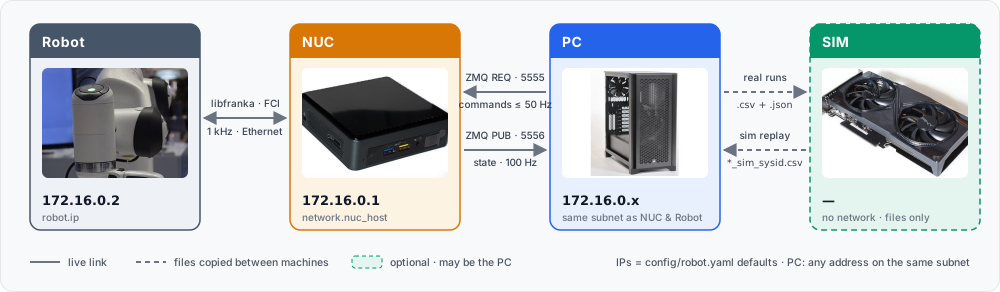
Robot#
Nothing to install. The FCI feature has to be present on the controller and the
robot switched into FCI mode from Desk — the web UI you open from the PC (or the
NUC) at the robot’s address, 172.16.0.2 by default. Franka’s guide covers it:
Installing the FCI Feature — one-time, needs the feature file from Franka.
Preparing the Robot for FCI in Desk and Activating FCI Mode — every session: unlock the joints, then enable FCI (FR3 and FER differ slightly; both are on that page).
NUC#
Ubuntu kernel#
You need what every libfranka user needs: Ubuntu 22.04 (20.04 also works) with a
PREEMPT_RT kernel, a user in the realtime group, and the robot
reachable on 172.16.0.2 (default). Franka’s own guide is the reference:
https://frankarobotics.github.io/docs/doc/libfranka/docs/real_time_kernel.html. The
deoxys prerequisites page
is a good condensed walkthrough of similar steps.
Check before continuing:
uname -v | grep -i preempt          # RT kernel
ulimit -r                            # >= 99 (rtprio)
ping -c1 172.16.0.2                  # FCI reachable
conda environment (libfranka)#
libfranka and the robot negotiate an FCI protocol version with no backward
compatibility — a wrong version builds and installs fine and fails only when
osc_shm opens a session (Incompatible library version (server version: 10, library version: 7)). Read the robot’s system version first and pick libfranka
from it:
curl -sk https://172.16.0.2/admin/api/system-version # e.g. "5.9.2"
robot system |
FCI protocol |
libfranka |
conda-forge package |
|---|---|---|---|
≥ 5.9.0 |
10 |
0.18 – 0.21 |
|
5.7.2 – 5.8.x |
9 |
0.15 – 0.17 |
|
5.7.0 – 5.7.1 |
8 |
0.14.x |
— (build from source) |
5.5 – 5.6 |
7 |
0.13.x |
— (build from source) |
Everything on the NUC — libfranka, the C++ build and the Python package — lives in
one conda env called frankatwin; activate it in every terminal that builds or
runs FrankaTwin. Our FR3 is on system 5.9.2:
conda create -n frankatwin -c conda-forge python=3.11 "libfranka=0.20" \
    eigen cmake cxx-compiler pkg-config make "sysroot_linux-64=2.28"
conda activate frankatwin
conda list | grep -E "^(libfranka|libpinocchio) "    # check: libfranka 0.20.x + libpinocchio (needed by libfranka >= 0.14)
Build and install#
conda activate frankatwin
git clone git@github.com:tsrobcvai/frankatwin.git && cd frankatwin
cmake -S . -B build -DCMAKE_PREFIX_PATH=$CONDA_PREFIX && cmake --build build -j$(nproc)
ls build/osc_shm build/move_to build/gripper_cmd build/read_current_q build/read_current_pose build/read_load

pip install -e ".[test]"                           # numpy, pyyaml, pyzmq (+ pytest)
python -m pytest tests -q                          # shm ABI, config, excitation, cli, gripper
Verify#
Robot: switch FCI mode on in Desk (Robot above).
NUC, in the env, before any daemon is running:
./build/read_current_q 172.16.0.2 # opens one libfranka session and prints q -- read-only, the arm does not move
NUC, in a second terminal, in the env — start the daemon and leave it running:
python -m frankatwin.daemon # launches osc_shm; the arm holds its pose under impedance control
NUC, back in the first terminal:
python -m frankatwin.doctor # RT kernel, rtprio, binaries + ldd, FCI reachable, daemon ping + state stream
read_current_q must print seven joint angles and doctor must end with
all good.: together they show libfranka is installed, linked and speaks the
robot’s protocol, and that the daemon answers on 5555 / 5556. The order matters:
read_current_q needs the FCI session, which the daemon holds from the moment
it starts. A [!!] fci clients line naming your own osc_shm is expected while
the daemon runs. Anything else — [XX] lines
(Troubleshooting → Build) or
Incompatible library version
(its entry)
— is covered there.
PC#
Same idea, Python only — a conda env called frankatwin, and every example or
script runs inside it:
conda create -n frankatwin -c conda-forge python=3.11
conda activate frankatwin
git clone git@github.com:tsrobcvai/frankatwin.git && cd frankatwin
pip install -e ".[analysis]"      # + pandas/matplotlib for scripts/compare_*.py, plot_*.py
Edit config/robot.yaml → network.nuc_host to the NUC’s address on the PC-facing
interface (the default 172.16.0.1 assumes the PC sits on the FCI subnet; use
the NUC’s LAN IP otherwise). Ports 5555 (REQ/REP) and 5556 (PUB) must be open.
Verify#
NUC, in its env:
python -m frankatwin.daemon— still running from the NUC verify step above, or started again now (robot in FCI mode).PC, in its env:
python -m frankatwin.doctor # daemon ping on 5555, state stream on 5556
doctor must end with all good. — the PC sees the daemon and receives the
100 Hz state stream. If it fails, network.nuc_host in config/robot.yaml is
the usual culprit (Troubleshooting → Communication).
SIM#
Only for the sysid loop (fit, replay, validate); skip it if you just want to control the arm. Needs IsaacLab ≥ 2.3.0 (the dynamic/viscous joint-friction API landed in 2.3). Install it following NVIDIA’s guide — Isaac Lab local installation (v2.3.0) — then deploy the shipped FrankaTwin extension once into that checkout; no IsaacLab source edits. On the SIM device:
git clone git@github.com:tsrobcvai/frankatwin.git && cd frankatwin
./isaaclab_sysid/install_into_isaaclab.sh /path/to/IsaacLab
conda activate <isaaclab env> && pip install cmaes pandas matplotlib
Installs Isaac-FrankaTwin-Sysid-v0 / Isaac-FrankaTwin-Replay-v0
(source/isaaclab_tasks/isaaclab_tasks/direct/franka_sysid/, auto-registered),
franka_mimic.usd (Franka with a panda_fingertip_centered frame) and the four
scripts under scripts/tools/. cmaes is for the fit; pandas and matplotlib
are for the comparison that apply_sysid_params.py --invoke-replay runs after
the replay (compare_sim_real.py; IsaacLab does not declare either). Always launch the scripts from the IsaacLab root —
the task configs reference the USD relative to it.
The installer copies the files, so run it again after every git pull of
frankatwin — otherwise IsaacLab keeps running the previous scripts and tasks.
Next: Usage — start the daemon on the NUC and drive the arm from the PC.